
RexAxles AR Mudlet GUI, Triggers, and Aliases
rexaxle
Posts: 42
11/19/2018, 1:01:28 AM
I got super busy some years back with fatherly duties & moving & work stuff - basically Everything Everywhere All At Once. Came back recently to see that some folks had been interested in the old GUI and that it was no longer available. Spent some time recently building out a new and improved one (it really is better than the original) with better captures and GMCP/MSDP/variable usage. Post any feedback.
This package was built and so far only tested on my Mac 14 inch, so curious if it works cross platform.
I wasn't sure what file service would permanently store any of the files I make or update, so I just put it in my google drive and made it shareable to anyone with the link. Enjoy!
Typing `gui.help` in game will provide a lot of other information about some of these commands.
Download mpackage:
https://drive.google.com/file/d/1JVDwF1obvmtoU3IUrjO4YM-hFh3p8_rj/view?usp=sharing
Download map:
https://drive.google.com/file/d/1B5A48MFxDAgceJ-GDfkyXo-CKI44rsCX/view?usp=sharing
To add the map go to Mudlet -> Preferences -> Mapper -> Load another map file in -> and then select the location of the download .dat (or even move it into the profile)
Screenshots:
https://ibb.co/MRjTk9m
https://ibb.co/rmhJMmS
https://ibb.co/2cZKTRs
https://ibb.co/7rX18Rw
https://ibb.co/4PCyrBN
https://ibb.co/9qmV4BG
https://ibb.co/z5my0Dx
https://ibb.co/TPCd3zP
https://ibb.co/SB5c933
https://ibb.co/9WCgQj9
https://ibb.co/kHZs6RV
https://ibb.co/yFLWFvp
https://postimg.cc/5j7VB8nf
https://postimg.cc/G9hRTXPM
This package was built and so far only tested on my Mac 14 inch, so curious if it works cross platform.
I wasn't sure what file service would permanently store any of the files I make or update, so I just put it in my google drive and made it shareable to anyone with the link. Enjoy!
Typing `gui.help` in game will provide a lot of other information about some of these commands.
Commands:

gui.help                   Show help

gui.list                   Display this list of aliases by itself

clear.chat                 Clear chat windows

clear.main                 Clear main window

clear.rooms                Clear saved rooms

clear.timer          Remove a single timer based on desc

clear.timers               Clear saved timers

find.room            Auto navigate to a room by id

get.aff                    Get the current affect list to easily copy

get.def                    Get the current defense abilities list to easily copy

get.off                    Get the current offense abilities list to easily copy

map.zoom              Zoom the map to the desired amount, larger num zooms out

pages.areas                Open the AR Areas page in your browser

pages.classes              Open the AR Classes page in your browser

pages.codex                Open the AR Codex page in your browser

pages.forum                Open the AR Forum page in your browser

pages.races                Open the AR Races page in your browser

path.find                  Follow the highlighted path (no target necessary)

q.w                        Quickwalk via highlighted path to the set in game `target` (only NPCs)

save.room            Save a room with a description why, to later be retrieved

save.timer      Save a timer in seconds with a desc (for minutes pass `m`, ex: 10m)

search.room          Searches for rooms based on part of Room Name

set.aff              Track this comma separated list of affect:command

set.def              Set a comma separated list of skills/spells to see in config

set.fontSize     Set the font size for box:

                           group | score | affects | bottom | minimap | exits

                           messages | config | inventory | roomdesc

set.off              Set a comma separated list of skills/spells to see in config

set.offhand          Set your offhand weapon for use in auto wielding after disarm

set.shield           Set your shield for use in auto wielding after disarm

set.tick              Set your own tick seconds variable (default is 25)

set.weapon           Set your weapon for use in auto wielding after disarm

show.aff                   Display the list of tracked affects and UP or DOWN status

show.area            Shows the area (world|area name) either in Messages or a popup box

show.areas                 Display all area names that can be used in `show.area `

show.kills                 Display number of counted kills

show.rooms                 Display rooms that have been saved

show.tick                  Display tick seconds variable

show.timers                Show all of the saved timers in a table

stop.walk                  Stop speedwalking

toggle.alive               Toggle keep session alive (sends `who | where` each minute)

toggle.attack              Toggle auto attacking (not murder) your set in game `target`

toggle.flee                Toggle whether to go back to in game `target` after fleeing

toggle.fontResize          Toggle whether to use font resizing with window resize

toggle.gui            Toggle whether to display box: left | right | bottom | info

toggle.kills               Toggle counting number of kills

toggle.murder              Toggle auto murdering your set in game `target`

toggle.qw                  Toggle Quickwalk (`qw` will only enable it on a temporary timer)

toggle.swap                Toggle whether to swap left or right gui window

toggle.tick                Toggle tick timer on/off

toggle.tickSleep           Toggle auto sleep on tick approaching and wake on tick

toggle.track               Toggle auto tracking to set in game `target` (only NPCs)

toggle.wield               Toggle auto grab and wield weapon after being disarmed

up.aff                     Sends commands to put any tracked aff DOWN affect (with shortcut) back UP


Features:

* Save your configuration settings via a DB so they are loaded in

* Full Map (via Map button at top of Mudlet)(DL map below)

* Minimap window

* Tick Timer

* Kill Counter

* Auto Attack Creature

* Auto Murder Target

* Lots of GMCP and MSDP variable usage

* Resizing

* HP/MANA/MOVES Gauges

* font resizing

* Affects Tracker

* Flee / Re Enter alias

* And more


Notes:

* I use the tick timer while levelling or fighting, it's very useful

* I often use the QW or path.find logic while questing or looking for NPCs that move

* It's a work in progress, post any errors/screenshots you might encounter

* I have only tested on a MAC 14 inch


example of how to use affects tracking:

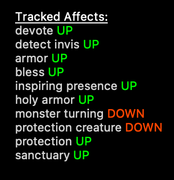
set.aff  devote:devote,detect invis:dinv,armor:armo,bless:bles,inspiring presence:insp,holy armor,monster

turning,protection creature


You are able to see the `requesting` hours ticking down in the affects window after requesting an item, kind of nice.
Download mpackage:
https://drive.google.com/file/d/1JVDwF1obvmtoU3IUrjO4YM-hFh3p8_rj/view?usp=sharing
Download map:
https://drive.google.com/file/d/1B5A48MFxDAgceJ-GDfkyXo-CKI44rsCX/view?usp=sharing
To add the map go to Mudlet -> Preferences -> Mapper -> Load another map file in -> and then select the location of the download .dat (or even move it into the profile)
Screenshots:
https://ibb.co/MRjTk9m
https://ibb.co/rmhJMmS
https://ibb.co/2cZKTRs
https://ibb.co/7rX18Rw
https://ibb.co/4PCyrBN
https://ibb.co/9qmV4BG
https://ibb.co/z5my0Dx
https://ibb.co/TPCd3zP
https://ibb.co/SB5c933
https://ibb.co/9WCgQj9
https://ibb.co/kHZs6RV
https://ibb.co/yFLWFvp
https://postimg.cc/5j7VB8nf
https://postimg.cc/G9hRTXPM
Help Information:


Just a quick note. All of these aliases are just extra tools to help you. Be smart and

keep track of what you have enabled, especially with tracking and auto murder/attack. It doesn't

take very long to get used to each alias.


Map:

The minimap is located at the bottom left (by default). The map can be made visible

by clicking the `Map` button at the top. It requires a map data file to have been loaded in.

Load in the provided map data file (.dat) to use. It will be docked by default, but can

be floated. The window will resize to compensate. Use `map.zoom ` to change the zoom

level, and using higher numbers will zoom out. Double clicking on a room will output

directions to the screen. The `find.room ` will work with the IDs seen in the map.


Info:

For best experience it helps to disable `automap` in game. There is resizing logic

for the boxes. If you enable it, then font sizes can be resized automatically also. For the

tick timer you will most likely need to let one TICK go by before it is effective and starts

displaying TICK APPROACHING messages. There is a logging button by default for Mudlet at the

bottom right, to the right of the tape cassette, the folder with a down arrow.

In order for you to set the font size correcly, `toggle.fontResize`

needs to be disabled. Then you use `set.fontSize  ` for any boxes size.

Using the minimap while fleeing (without `toggle.flee` set) then it helps to manually

see the direction you fled in, and `toggle.flee` works on players.


Config:

All of the variables in the other section can be set with its respective alias. Each of the

variables under each section should update automatically when it is toggled or changed as well as

affecting whatever logic it should. The `set.weapon `, `set.offhand `,

and `set.shield ` aliases work with the `toggle.wield` alias.

Use the name for your weapon/shield/offhand that you would use if it were on the ground. If an

offhand is set, when main weapon is disarmed it will grab and wear and then dual the offhand.

If you don't give a name for any of the variables, but still have `toggle.wield` enabled,

then it will fall back to `g 1.;;wear 1.` for that respective slot (ex: main

weapon is set but shield is not, so enemy disarms your shield and the fallback is used).

(different use case: you are dual wielding but don't have `offhand` set, and enemy disarms your

main weapon | main weapon is grabbed and wielded and the offhand is left in the inventory). Clear

them by not passing a  in the alias. The `set.off ` and `set.def `

are used to add text under either `Offense Abilities` or `Defense Abilities` for you to easily

recall anything that may be helpful in the moment. You can pass in ansi color tags to set the

colors for easier recognition (ex: `set.off kick,bash`). Clear them by not

passing  in the alias.


Affects Tracker:

The affects list passed in with `set.aff ` needs to be comma separated.

The affect given in the list must be spelled correctly in order to be tracked. To also pass in

the shortcut alias for the affect you are tracking then include a colon (ex: `armor:armo`) and

shortcut with your affect so that it can be also be put back up during `up.aff`.

An easy process to follow in order to put all affects up is to initially `set.aff `

and then use `up.aff`. Use `get.aff` to retrieve your list for easy copying.


Quickwalk:

Only works with NPCs. First set your in game `target` and you have to be in the

same area as them, and then simply `q.w` to start moving toward them. If the yellow

exit direction indication goes away then you'll need to type `qw` again to keep moving

toward them. Basically continuously `q.w` as much as you need or want to get close to or

all the way to your target. Use in conjuection with `toggle.attack` to kill the target.


Path Find:

`path.find` works with any highlighted yellow path.


Tracking:

Only works with NPCs. First set your in game `target` and you have to be in the same area as them.

Tracking (`toggle.track`) will continuously look for and move toward your `target`.

If you are attacked then it will not attempt to flee or interrupt that process

(that's up to you), but upon seeing the death message then tracking will continue.

It will also attempt to unlock and open a door that is blocking your way. You need

to be smart while using the tracking feature. Probably don't use it in an area that

creatures are going to autoattack you, or maze like areas, or any area that's more dangerous

than usual. If for any reason something interrupts the tracking process and you are stopped

in a room, then using the `q.w` alias will help to continue the tracking process.

Use in conjuction with `toggle.attack` to kill the target. It will also attempt

to unlock door/open door/move that direction and if fails you will need to deactivate and take over.


Search / Finding Room by ID:

In order to begin using the find room alias, you first need to `search.room `.

Once you have identified the room ID from this list (if the room is found), then it

should be used in the corresponding `find.room ` alias. Finding a room by id

with alias `find.room ` (ex: find.room 4501) will speedwalk to the destination if

it is found within the Map.dat file and is not behind a void area. Any obstacles along

the way should stop the speedwalk and allow you to get past the obstacle and then you can

use the same find room alias to continue or take over yourself. Manually stop with `stop.walk`.

Rooms that are behind special doors (ex: doorway, portal, etc) act as if behind a void.

HINT: Click on a room in the map to see the VNUM for anywhere.


Saving Rooms:

To save a room use the alias `save.room ` and give an appropriate description. Retrieve

the saved rooms with the `show.rooms` alias. Input the respective room ID into the alias

`find.room ` in order to quickly navigate back to the saved room. Clear all of the

saved rooms with the `clear.rooms` alias.


Saving Timers:

To save a timer use the alias `save.timer  ` and give the time in seconds

and an appropriate description for retrieval later. Once a timer has completed then a message:

`Timer: (desc) has completed` will be displayed. To see all saved timers

then use the `show.timers` alias, which will output them in table format. Completed timers

are not removed from the list so that way you can recall the timer and location when viewing,

and they will show `completed=true` in the table. To remove a single timer from the list use

`clear.timer ` or you can clear all timers with `clear.timers`.


Showing Areas:

Use `show.areas` to display all areas that can be used with `show.area `.

`show.area ` will show the area map from the website if it is available. Any map not available

will show a message in the `Messages` box. Check the website for comparison. The world map display

looks just like the one on the website but with a few spacing issues, not too bad. The area will

either show in a popup box or in the `Messages` box.
rexaxle
Posts: 42
11/19/2018, 1:20:28 AM
I formatted it I think as best I can, made a bunch of edits to get spacing down. Using list and /list for that because I couldnt figure out if there was a way to just indent or tab content out - list and /list adds that extra spacing.
So I understand that this has a lot going on in it. Windows on left and right + tabs with either MSDP data updating dynamically or screen captures updating it. It's a bit crude since its mostly text for everything instead of more guages to show things. It was tough to try and fit everything I wanted into it and I already have more ideas for how to improve it (who list could be wider probably, regex captures ive seen that can be improved, colors, messages being grabbed, etc). Stay tuned for updates and please post issues here because I want to fix stuff. When you are posting an issue, idea, or anything, if you could include a link to a screenshot to better help get your point across then I think that would really help. I used imgbb free public image upload service - there are lots though.
Definitely would like some layout suggestions.
So I understand that this has a lot going on in it. Windows on left and right + tabs with either MSDP data updating dynamically or screen captures updating it. It's a bit crude since its mostly text for everything instead of more guages to show things. It was tough to try and fit everything I wanted into it and I already have more ideas for how to improve it (who list could be wider probably, regex captures ive seen that can be improved, colors, messages being grabbed, etc). Stay tuned for updates and please post issues here because I want to fix stuff. When you are posting an issue, idea, or anything, if you could include a link to a screenshot to better help get your point across then I think that would really help. I used imgbb free public image upload service - there are lots though.
Definitely would like some layout suggestions.
BlackWidow
Posts: 632
11/19/2018, 3:45:21 AM
Try looking up BBCode with regards to indenting?
rexaxle
Posts: 42
11/24/2018, 5:19:04 PM
(old post no longer valid)
rexaxle
Posts: 42
12/6/2018, 4:57:18 PM
Just curious, has anyone had the chance to use this and does anyone like it?
Again please post any requests/bugs & issues/ideas if you have some, thanks.
Again please post any requests/bugs & issues/ideas if you have some, thanks.
Davairus

Posts: 10697
12/6/2018, 6:15:15 PM
To be honest I hadn't realized you had edited the original post with so much updates. I'll install and check it out ASAP, I wasnt sure whether it was me but none of the screenshots loaded so I got nothing else to say yet, but the feature list looks goddamn awesome.
Dalero

Posts: 114
12/7/2018, 11:19:19 PM
I'm setting this up and I'll take it with me when I go on vacation so I can give it a good critique. Prior experience is only zmud and the web client currently.
First thought, I've enabled everything you put up, score tab, not sure what it's supposed to do, but it's blank for me.
Request- when full room descriptions are turned on you see that mini map. I'd love for that to be in a tabbable window, I use it to navigate, even if it is a crutch.
First thought, I've enabled everything you put up, score tab, not sure what it's supposed to do, but it's blank for me.
Request- when full room descriptions are turned on you see that mini map. I'd love for that to be in a tabbable window, I use it to navigate, even if it is a crutch.
rexaxle
Posts: 42
12/8/2018, 3:01:20 AM
Did you go into Preferences and "Enable MSDP", Dalero? When the [INFO] MXP Enabled message pops up once you login to AR, then that should trigger starting the MSDP capture. If you have disabled MXP in AR and the message doesn't appear then I added an alias "_init" that you can type and it will start MSDP capture manually.
Dalero
Posts: 114
12/8/2018, 3:38:50 AM
Yea, I followed your instructions. had to use the manual initialization. Score tab still didn't populate for me. Inventory and EQ did, as did the chat. Didn't get a chance to look into the other stuff yet.
*edit again* I just realized that that MDSP wasn't enabled on this tab. oops!
Everything seems to be working nicely now!
*edit yet again for idea*
I don't see anywhere on the HUD where your ***target*** variable would be. Maybe under the score window would be a good place for it?
*edit again* I just realized that that MDSP wasn't enabled on this tab. oops!
Everything seems to be working nicely now!
*edit yet again for idea*
I don't see anywhere on the HUD where your ***target*** variable would be. Maybe under the score window would be a good place for it?
rexaxle
Posts: 42
12/8/2018, 11:47:55 AM
Fuck Yeah!!!! I'm so glad you were able to get it working lol. Cool, np I will definitely add target into the Combat tab. I have already made some pretty sweet changes to the combat tab coming out in 1.2, but have not yet added that. Thank you!
Dalero
Posts: 114
12/8/2018, 2:42:34 PM
there a way to resize the windows a bit in the GUI? I'd like to have the tabs and information screens smaller and the main window larger.
rexaxle
Posts: 42
12/8/2018, 3:54:06 PM
(old post no longer valid)
rexaxle
Posts: 42
12/12/2018, 4:33:03 PM
(old post no longer valid)
BlackWidow
Posts: 632
12/12/2018, 7:47:28 PM
Just for curiosity's sake, I'd like to ask something...
What kind of logging system does the client have? Is it possible to create logs as a sort of video stream and then replay them offline?
What kind of logging system does the client have? Is it possible to create logs as a sort of video stream and then replay them offline?
rexaxle
Posts: 42
12/12/2018, 8:38:12 PM
Setup for logging can be done in Mudlet -> Preferences. At the bottom there you can adjust where logs are saved and select a format to save them in from the dropdown. At the bottom right of the client you can choose to start logging game output to a file, which will log output to a ".txt" file in a location you chose. There is another option at the bottom right to start to "Record a replay", which will save to a ".dat" file in the mudlet profiles log folder. I'm not quite sure about the ".dat" replay file that is saved, I will have to test and play with it.
As far as creating a replay mechanism/functionality, I could probably build something like that out.
As far as creating a replay mechanism/functionality, I could probably build something like that out.
rexaxle
Posts: 42
12/12/2018, 8:50:01 PM
(old post no longer valid)
rexaxle
Posts: 42
12/13/2018, 3:10:11 PM
Version 1.2 updated now to include Emerald Forest in the map. Updated the GUI/Scripts download link and the mapping feature areas list in the main post. Enjoy.
Nycticora
Posts: 2277
12/14/2018, 3:15:36 AM
I guess I have to try this now, will report back with experience if I can get it working.
rexaxle
Posts: 42
12/16/2018, 8:53:50 PM
Very interested in anyone's experience using this. Would like to know what you like about it, what you hate, what you would like to see, who is even using it, etc. I have a lot of ideas (way more than what's listed as planned for 1.3). One of those ideas would be to add some functionality to get a list of logs from the server, setup a clickable link for each item that would temporarily download the log for display inside of Mudlet, and setup an auto-scrolling mechanism for the logs (would be configurable and if set to false then would just load the entire thing).
Dalero
Posts: 114
12/17/2018, 1:29:53 AM
I'm on vacation with the family so my time is pretty erratic right now. I'll take another crack at it when I have some down time.
Faelon
Posts: 938
1/3/2019, 1:12:57 AM
I've been playing with this and I have to say I really like it. It has a ton of cool functionality and I think I may start to use it as we enter the new year.
A few requests/questions.
Can one set of windows be moved to either side of the game itself? As it is, where you are typing is way off the left and the game itself is way off to the right. Any fix for this?
Targeting seems to be based on the in game functions, which is fine, but doesn't appear on the map you created. I'm not even sure if it's possible to overlay one over the other, if it isn't, that's cool, but it makes it so people who prefer to play with the room desc's brief, can no longer do so or lose that @ function for targets.
Other than that, you put in a lot of effort and it is appreciated! Thanks.
EDIT: ALSO - your maps are epic and I dig them. More of these please.
A few requests/questions.
Can one set of windows be moved to either side of the game itself? As it is, where you are typing is way off the left and the game itself is way off to the right. Any fix for this?
Targeting seems to be based on the in game functions, which is fine, but doesn't appear on the map you created. I'm not even sure if it's possible to overlay one over the other, if it isn't, that's cool, but it makes it so people who prefer to play with the room desc's brief, can no longer do so or lose that @ function for targets.
Other than that, you put in a lot of effort and it is appreciated! Thanks.
EDIT: ALSO - your maps are epic and I dig them. More of these please.
Flyndance
Posts: 35
1/3/2019, 10:10:21 AM
A few suggestions:
- auto switch weapons for combat style and weapon advantage will be interesting
- map interface with visual support to assist target location tracking
- auto tracking capability
- room name search function to find where the room is exactly
- fleeing and re-entering scripts
- maze solving
- tick pass detection
- autosleep to catch ticks and autowaking on tick pass
- forging scripts
- affects detection for one button press to upkeep essential spells
- auto switch weapons for combat style and weapon advantage will be interesting
- map interface with visual support to assist target location tracking
- auto tracking capability
- room name search function to find where the room is exactly
- fleeing and re-entering scripts
- maze solving
- tick pass detection
- autosleep to catch ticks and autowaking on tick pass
- forging scripts
- affects detection for one button press to upkeep essential spells
hamsandwich
Posts: 268
1/9/2019, 4:02:41 AM
This looks incredible. I haven't had a chance to play with it yet but it has a ton of features and looks like an awesome QoL update from how I'm used to playing MUDs. Really cool work man!
I tried reading through most of this thread and i think I noticed you talking about the sizing and placement of the windows and it doesn't seem like theres any customizability in that on our user end? The way it is set up now with the "game" itself being on the far right is hard for me. Idk why but maybe because I'm used to the text always originating on the left of the window it seems really far over there and awkward to look at.
Other than that tho from my little bit of time spent dinking around with it it looks great! Definitely planning on using it.
I tried reading through most of this thread and i think I noticed you talking about the sizing and placement of the windows and it doesn't seem like theres any customizability in that on our user end? The way it is set up now with the "game" itself being on the far right is hard for me. Idk why but maybe because I'm used to the text always originating on the left of the window it seems really far over there and awkward to look at.
Other than that tho from my little bit of time spent dinking around with it it looks great! Definitely planning on using it.
rexaxle
Posts: 42
1/10/2019, 3:40:27 PM
It's nice to see some folks starting to use it. I can definitely add functionality so that you can put either of the 2 columns on one side or the other. I think it will for now always remain 2 columns. I will make the default to have the chat column on the right (with map included), then will add user configurable functionality so you can hide/move either column (along with the resizing functionality already setup - mentioned in the main post).
As for "map interface with visual support to assist target location tracking", that won't be possible on the map I have created. You have no way of knowing the ROOM_VNUM a user is in based on "where" and it doesn't seem worth it to do the research / implement it just for "scan". I'll keep this in my mind though and see if I come up with something. Once I move the chat column to the right and have the who/where/score column on the left only, then you will be able to see the where box much easier at a quick clance. Then you can quickly move through rooms typing "where" and glancing at the where box as you move quicker than you can process (if that makes sense) - I have practiced this a few times and once you get used to it, it has the potential to make your tracking ability significantly increase.
"Targetting" is just a trigger that picks up on the in game message when you set a target. "$$ updated to :" or w/e the message is. And it untargets from the untargetting message. It won't be possible to show your target on the map I setup.
For "auto tracking capability" - I tried something like that out with my quickwalking. It quickly became way too interruptive actually trying to do other things while "where" and move commands were being spit out automatically. Will think on it.
For "room name search functionality", I was planning on doing something like this in the future. It will really make more sense/work better once I have most or all of the mapping done.
I could do "fleeing and re-entering" script / alias.
What is "maze solving"?
I have "tick pass detection" you can turn on the tick timer with "stt". This will output "Tick Approaching" and "Ticked: #" messages.
For "autosleep to catch ticks and autowalking on tick pass" - I guess that you mean when you are quickwalking (through "qw" alias) or speedwalking by clicking on the map? Once I complete more areas and mapping I can add this in. Eventually going to make it open unlocked doors as well.
I can do forging scripts. Will put it in the plans.
For "affects detection - one button press to upkeep essentials". Just to clarify I assume you mean from the affects you are tracking via the "afftrack" alias, you would like to also put all of those up with either the press of a button or another alias? I could add that, I can add custom buttons also that become part of the toolbar instead of just UI - might do that and add an alias since some people prefer to do everything with minimal clicking (myself included).
As for "map interface with visual support to assist target location tracking", that won't be possible on the map I have created. You have no way of knowing the ROOM_VNUM a user is in based on "where" and it doesn't seem worth it to do the research / implement it just for "scan". I'll keep this in my mind though and see if I come up with something. Once I move the chat column to the right and have the who/where/score column on the left only, then you will be able to see the where box much easier at a quick clance. Then you can quickly move through rooms typing "where" and glancing at the where box as you move quicker than you can process (if that makes sense) - I have practiced this a few times and once you get used to it, it has the potential to make your tracking ability significantly increase.
"Targetting" is just a trigger that picks up on the in game message when you set a target. "$$ updated to :
For "auto tracking capability" - I tried something like that out with my quickwalking. It quickly became way too interruptive actually trying to do other things while "where" and move commands were being spit out automatically. Will think on it.
For "room name search functionality", I was planning on doing something like this in the future. It will really make more sense/work better once I have most or all of the mapping done.
I could do "fleeing and re-entering" script / alias.
What is "maze solving"?
I have "tick pass detection" you can turn on the tick timer with "stt". This will output "Tick Approaching" and "Ticked: #" messages.
For "autosleep to catch ticks and autowalking on tick pass" - I guess that you mean when you are quickwalking (through "qw" alias) or speedwalking by clicking on the map? Once I complete more areas and mapping I can add this in. Eventually going to make it open unlocked doors as well.
I can do forging scripts. Will put it in the plans.
For "affects detection - one button press to upkeep essentials". Just to clarify I assume you mean from the affects you are tracking via the "afftrack" alias, you would like to also put all of those up with either the press of a button or another alias? I could add that, I can add custom buttons also that become part of the toolbar instead of just UI - might do that and add an alias since some people prefer to do everything with minimal clicking (myself included).
Flyndance
Posts: 35
1/14/2019, 3:52:22 AM
The previous list of features I mentioned are simply suggestions that are possibly achievable within the current framework of AR. My apologies that I am not using your client but my own implementation of CMUD.
For example, if you already have a way to detect tick passing, it would be quite simple to create a script to sleep prior to tick pass and wake upon tick pass, hence catching the tick automatically for recovery purposes.
Maze solving helps to traverse mazes like the void and grove easily. Just food for thought but implementation will be interesting and challenging (maybe).
With the entire realm mapped out, doors to interesting functions may become available.
MSDP affects shows the string of affects. Just got to parse the string to store meaningful information into variables to track the affects and manipulate the information for better use as you see fit.
For example, if you already have a way to detect tick passing, it would be quite simple to create a script to sleep prior to tick pass and wake upon tick pass, hence catching the tick automatically for recovery purposes.
Maze solving helps to traverse mazes like the void and grove easily. Just food for thought but implementation will be interesting and challenging (maybe).
With the entire realm mapped out, doors to interesting functions may become available.
MSDP affects shows the string of affects. Just got to parse the string to store meaningful information into variables to track the affects and manipulate the information for better use as you see fit.
velvet socks
Posts: 1
2/26/2020, 5:55:20 PM
Hey, I was just pointed to this thread, and I'd like to say that your plugin has been really helpful. Thank you!
Davairus
Posts: 10697
5/28/2020, 8:16:41 AM
This client is available for mac.. shit. Game changer.
Necrobotica
Posts: 31
5/28/2020, 3:45:20 PM
Is this still being updated? I was curious if there is an easy way to resize the windows and such?
Davairus
Posts: 10697
5/28/2020, 5:01:10 PM
Mudlet users. Make sure you put a %c at the end of your prompt because mudlet is doing some weird stuff with the prompt not showing up (arguably, this is AR's fault). Its waiting for a GA signal which tells the client that all the data has been sent and its time to display it. The carriage return in the prompt will instead send an empty line and itll send your prompt properly instead of waiting. This is for sure the case on a mac laptop. I am not sure if it is the case for windows PC's.
edit: nvm. I fixed it.
Necrobotica : I am not sure if Rexaxle still updates but you can try emailing or forum PM him (which I think sends an email)
edit: nvm. I fixed it.
Necrobotica : I am not sure if Rexaxle still updates but you can try emailing or forum PM him (which I think sends an email)
Davairus
Posts: 10697
6/3/2020, 8:32:08 AM
MSDP MAP INSTRUCTIONS FOR MUDLET HERE
1. Mudlet scripts need to send this on game connect.
This will cause the mud to know that the player is using "Mudlet" (thats what the client_id needs to be). That tells the game to send ROOM_MAP string with \\n instead of \n so that it obeys the mudlet definition of valid json (per https://mudhalla.net/tintin/protocols/msdp/ msdp does not have to be valid json)
2. Create a container for the map.
suggest that you make something to create a new window when you start the game like, this. Basically this creates a resizeable window. Necrobotica, I guess this answers your question too?
Feel free rename testuserwindow, just make sure you are using something consistent.
3. Create an event handler to update the map
You need add script called room_map. Give it an event handler for msdp.ROOM_MAP and put this in the body.
Note that the name of the script needs to match the name of the function inside the script. And testuserwindow needs to match whatever you called the window in step2.
P.S. If you are looking in as a user of some other mudclient that can't process the map because of so-called "invalid json" just let me know what CLIENT_ID you are sending to the mud.
BTW Mudlet is awesome.
1. Mudlet scripts need to send this on game connect.
lua sendMSDP("SEND","CLIENT_ID")
This will cause the mud to know that the player is using "Mudlet" (thats what the client_id needs to be). That tells the game to send ROOM_MAP string with \\n instead of \n so that it obeys the mudlet definition of valid json (per https://mudhalla.net/tintin/protocols/msdp/ msdp does not have to be valid json)
2. Create a container for the map.
suggest that you make something to create a new window when you start the game like, this. Basically this creates a resizeable window. Necrobotica, I guess this answers your question too?
testuserwindow = Geyser.UserWindow:new({

  name = "TestUserWindow",

  titleText ="My Test UserWindow", -- only available since Mudlet 4.8+

  x = "20%", y="20%",

  width="30%", height ="40%"

})

testuserwindow:setFontSize(14)
Feel free rename testuserwindow, just make sure you are using something consistent.
3. Create an event handler to update the map
You need add script called room_map. Give it an event handler for msdp.ROOM_MAP and put this in the body.
function room_map()

  testuserwindow:clear()


  msdp.ROOM_MAP = msdp.ROOM_MAP:gsub("%``","")

  msdp.ROOM_MAP = msdp.ROOM_MAP:gsub("%`2","")

  msdp.ROOM_MAP = msdp.ROOM_MAP:gsub("%`0","")

  msdp.ROOM_MAP = msdp.ROOM_MAP:gsub("%`1","")

  msdp.ROOM_MAP = msdp.ROOM_MAP:gsub("%`2","")

  msdp.ROOM_MAP = msdp.ROOM_MAP:gsub("%`3","")

  msdp.ROOM_MAP = msdp.ROOM_MAP:gsub("%`4","")

  msdp.ROOM_MAP = msdp.ROOM_MAP:gsub("%`5","")

  msdp.ROOM_MAP = msdp.ROOM_MAP:gsub("%`6","")

  msdp.ROOM_MAP = msdp.ROOM_MAP:gsub("%`7","")

  msdp.ROOM_MAP = msdp.ROOM_MAP:gsub("%`8","")

  msdp.ROOM_MAP = msdp.ROOM_MAP:gsub("%`9","")

  msdp.ROOM_MAP = msdp.ROOM_MAP:gsub("%`!","")

  msdp.ROOM_MAP = msdp.ROOM_MAP:gsub("%`@","")

  msdp.ROOM_MAP = msdp.ROOM_MAP:gsub("%`#","")

  msdp.ROOM_MAP = msdp.ROOM_MAP:gsub("%`^","")

  msdp.ROOM_MAP = msdp.ROOM_MAP:gsub("%`$","")

  msdp.ROOM_MAP = msdp.ROOM_MAP:gsub("%`&","")

  msdp.ROOM_MAP = msdp.ROOM_MAP:gsub("%`%%","")

  msdp.ROOM_MAP = msdp.ROOM_MAP:gsub("%`%$","")


  testuserwindow:cecho(msdp.ROOM_MAP)

end
Note that the name of the script needs to match the name of the function inside the script. And testuserwindow needs to match whatever you called the window in step2.
P.S. If you are looking in as a user of some other mudclient that can't process the map because of so-called "invalid json" just let me know what CLIENT_ID you are sending to the mud.
BTW Mudlet is awesome.
JeepGuy
Posts: 11
10/1/2020, 4:39:20 PM
Is tiny upload the only place to get the files? I can't get those links to work.
Mr. Forgotten
Posts: 552
10/2/2020, 8:10:42 AM
Did anyone get this to work? I the provided links didn't take me anywhere.
dead
Posts: 120
1/23/2022, 11:45:52 AM
So, tinyupload doesn't exist anymore. Does anyone still have a copy of this? Have been using Dav's "offical" mudlet client that autodownloads, but would love to try out this one. Want to see how it works, I am been tinkering but having problems with lots of things.
tldr
Anyone have the old files:
GUI/Scripts Version 1.2
TRIGGERS Version 1.2
ALIASES Version 1.2
tldr
Anyone have the old files:
GUI/Scripts Version 1.2
TRIGGERS Version 1.2
ALIASES Version 1.2
Davairus
Posts: 10697
1/25/2022, 9:33:25 AM
Maybe try the wayback machine? Longshot I know.
rexaxle
Posts: 42
3/18/2023, 6:34:19 AM
Just updated the original post with a new link to download the mpackage, and presumably this link will exist as long as my email does. I too had lost all of those original files and had to re-learn everything for a little bit, and then build it all back out. I think it's better than the first version. Sorry that all of those originals were lost, I hadn't counted on tinyupload going away.
Davairus
Posts: 10697
3/18/2023, 6:43:29 AM
WB rexaxle! great to see you back around.
rexaxle
Posts: 42
3/19/2023, 11:49:01 AM
Great to be back! I love playing and contributing. I just put an updated download link on the main post with a quick fix for `clearing windows on re-connect` and fixed the `rxa.list` (commands) to be the same as in the `rxa.help` menu. The windows not clearing on re-connect was frustrating me.
rexaxle
Posts: 42
3/20/2023, 2:42:24 AM
In testing some it doesn't seem like `msdp.QUESTOR` or `msdp.HINT` return anything. It would awesome to have QUESTOR if at all possible.
rexaxle
Posts: 42
3/20/2023, 3:24:26 PM
This isn't an update on the current file available for download, just a small update on some progress.
Font size resizing is coming along. The only scrollable boxes are the Chat windows and so this will be a nice feature to have. In addition to that I am going to also give the user the ability to set their own font size for affects/combat/where manually if they choose and have toggleable aliases to choose which of those boxes should receive font size resizing (this would require turning off resize for box first and then setting font size for that box - otherwise the resizing logic would take over). It didn't seem like Chat needed the resizing that much, but if it becomes requested later I can add that in.
Everything appears to be pretty stable and I think more performant with fixes behind the scenes and config optimizations. The Combat window is looking much better and making more sense visually I think to assist on the fly. GUI style updates, lots of little fixes as I noticed things, quickwalking feature, tracking feature, flee and re-enter feature, affects tracker, updated INV and Group tabs to use MSDP variables, fixed regex for captures. Working on getting things evenly spaced in boxes (ex: WHO, WHERE, etc).
Screenshot:
https://ibb.co/x7tBPg5
Font size resizing is coming along. The only scrollable boxes are the Chat windows and so this will be a nice feature to have. In addition to that I am going to also give the user the ability to set their own font size for affects/combat/where manually if they choose and have toggleable aliases to choose which of those boxes should receive font size resizing (this would require turning off resize for box first and then setting font size for that box - otherwise the resizing logic would take over). It didn't seem like Chat needed the resizing that much, but if it becomes requested later I can add that in.
Everything appears to be pretty stable and I think more performant with fixes behind the scenes and config optimizations. The Combat window is looking much better and making more sense visually I think to assist on the fly. GUI style updates, lots of little fixes as I noticed things, quickwalking feature, tracking feature, flee and re-enter feature, affects tracker, updated INV and Group tabs to use MSDP variables, fixed regex for captures. Working on getting things evenly spaced in boxes (ex: WHO, WHERE, etc).
Screenshot:
https://ibb.co/x7tBPg5
Davairus
Posts: 10697
3/21/2023, 1:55:39 AM
I pushed a fix for mudlet msdp questor but its a bit weird with reboots, just a heads up about it . Also I think it only sends 3.
rexaxle
Posts: 42
3/21/2023, 9:08:48 AM
Nice! That's not bad, good enough to use to start to get something going. Is that a hard limit on the 3 being sent due to text constraints? Here's what we have right now for example:
typing "quest" returns:
msdp.QUESTOR returns:
If there is a text limit, then (even though it is not as good) maybe only the quest names could be sent back in MSDP.QUESTOR? Would it be any better (or possible) if it came from GMCP? Or maybe just returning the currently `tracked` quest is a fair trade off if the full ilst is not available.
typing "quest" returns:
1. Goblin extermination (Level 4 - Seringale)

 [   ] - Collect six goblin trophies and give them to the exterminator. (0/6)

2. Guild initiation (Level 5 - Goblin Village)

 [   ] - Prove your worth to Cavan by killing all the goblin guards.

3. Goblinator (Level 5 - The Miden'nir)

 [   ] - Kill common goblins (1/3)

 [   ] - Kill small goblins (0/8)

 [   ] - Kill goblin guards (0/8)

4. Fillet this! (Level 3 - The Miden'nir)

 [   ] - Find Horga in the Slaughtered Lamb Inn.
msdp.QUESTOR returns:
  QUESTOR = { { {

        position = "1",

        steps = { {

            done = "0",

            instruction = "Collect six goblin trophies and give them to the exterminator.",

            qty = "6"

          } },

        title = "Goblin extermination"

      }, {

        position = "2",

        steps = { {

            done = "0",

            instruction = "Prove your worth to Cavan by killing all the goblin guards."

          } },

        title = "Guild initiation"

      }, {

        position = "3",

        steps = { {

            amt = "1",

            done = "0",

            instruction = "Kill common goblins",

            qty = "3"

          }, {

            done = "0",

            instruction = "Kill small goblins",

            qty = "8"

          }, {

            done = "0",

            instruction = "Kill goblin guards",

            qty = "8"

          } },

        title = "Goblinator"

      } } },
If there is a text limit, then (even though it is not as good) maybe only the quest names could be sent back in MSDP.QUESTOR? Would it be any better (or possible) if it came from GMCP? Or maybe just returning the currently `tracked` quest is a fair trade off if the full ilst is not available.
rexaxle
Posts: 42
3/22/2023, 9:36:29 PM
Buckle up, buckaroos
I just updated the download on the original post! Lots of new updates and features included in that post. Added a lot of things, improved the GUI styling, and fixed a lot of things in terms of regex captures and other little things I noticed behind the scenes as I was developing. It appears to be pretty stable and consistent. I hope everyone enjoys. There's a lot going on here and I think it enhances the experience. Let me know if you see anything off. Please take screenshots. You can use as little or as much makes sense to you alias wise, even without alias usage there's a lot going on for you window wise.
NEW UPDATE!
I just updated the download on the original post! Lots of new updates and features included in that post. Added a lot of things, improved the GUI styling, and fixed a lot of things in terms of regex captures and other little things I noticed behind the scenes as I was developing. It appears to be pretty stable and consistent. I hope everyone enjoys. There's a lot going on here and I think it enhances the experience. Let me know if you see anything off. Please take screenshots. You can use as little or as much makes sense to you alias wise, even without alias usage there's a lot going on for you window wise.
Davairus
Posts: 10697
3/23/2023, 5:28:09 AM
ok we can try adding more but it might cause a buffer overflow server-side, but returning the tracked quest does sounds like a decent alternative. just let me recover from the previous code binge and then ill look.
rexaxle
Posts: 42
3/24/2023, 1:50:34 AM
I didn't notice before that using `where ` doesn't highlight the path yellow, so that changes the TRACKING / QUICKWALK / FLEE & RE-ENTER capability. It seems to only highlight where NPCs are, so that still works. Also there is logic that in the tracking that will follow the target if they flee, so that will work on a player. I will have to think about it how a player tracking might work (if at all) since their path isn't highlighted.
dead
Posts: 120
3/24/2023, 3:13:10 AM
The 'group font size' doesn't change anything.
rexaxle
Posts: 42
3/24/2023, 3:29:56 AM
Nice, thanks for calling that out dead - looked and I had set it up, but completely just forgot to add its font variable to the group update. Just fixed and it will be out with next release.
Other than that I decided that I wanted to give a crack at the mapping also and created a script that is working pretty well for me. It's a big work in progress obviously as each area needs to be mapped. I imagine the first release of it will be all the easily accessible areas and rooms and then over time as I have characters capable I can add some harder to get to places.
Screenshot:
https://ibb.co/jgYR91t
Other than that I decided that I wanted to give a crack at the mapping also and created a script that is working pretty well for me. It's a big work in progress obviously as each area needs to be mapped. I imagine the first release of it will be all the easily accessible areas and rooms and then over time as I have characters capable I can add some harder to get to places.
Screenshot:
https://ibb.co/jgYR91t
Davairus
Posts: 10697
3/24/2023, 4:04:02 AM
rexaxle the player yellow road tracking is still applicable with paladins hunt evil skill, just a fyi.
dead
Posts: 120
3/24/2023, 4:33:49 AM
I have no intention of creating a map for anyone other then myself, the goal was to have a functional mapper for people to use if they wished. A huge part of the fun is exploring. I mean, I found a new room in SERINGALE because I was exploring for the first time in ages.
rexaxle
Posts: 42
3/24/2023, 5:43:44 PM
The TRACK/QUICKWALK is just going to be for NPCs basically, but it will still work in any scenario where the path is highlighted yellow. It still works well if you are quickwalking to any npc or if you need to track a moving npc like the panicked bard. I'll probably change the flee & re-enter logic so it can be used for PKing. (will update the help info for those in the next release.
I'm feeling pretty good about the mapping, it isn't that bad with the script features I have in place. It will be a dockable or floatable window and I'm going to give the ability to hide the LEFT or RIGHT GUI windows if you feel you don't want to see any of that. And I'm going to make sure certain settings are saved so that if you close / quit out of Mudlet that on re-load it will use those settings (ex: Right / Left gui show / hide status)
Screenshot:
https://ibb.co/gg0VtWJ
I'm feeling pretty good about the mapping, it isn't that bad with the script features I have in place. It will be a dockable or floatable window and I'm going to give the ability to hide the LEFT or RIGHT GUI windows if you feel you don't want to see any of that. And I'm going to make sure certain settings are saved so that if you close / quit out of Mudlet that on re-load it will use those settings (ex: Right / Left gui show / hide status)
Screenshot:
https://ibb.co/gg0VtWJ
Davairus
Posts: 10697
3/24/2023, 6:31:14 PM
rexaxle, in the other mapper thread dead has just posted , it shows that you can have the room colorized based on the terrain, which is cool, and not a heavy lift, its MSDP_TERRAIN or gmcp.room.info.terrain , definitely looks cooler with the terrain from my point of view. of course I made the in game ascii map so you already know my biases.
rexaxle
Posts: 42
3/24/2023, 7:07:59 PM
Good call - I hadn't looked at his, but that's a great addition. Going to work that in. Nice work, dead.
I've had a lot of good ideas on how to further improve the GUI setup. Going to clean it up a lot and only show auto updateable info (instead of captures all over the place). Going to try and make all the boxes configurable as possible too
I've had a lot of good ideas on how to further improve the GUI setup. Going to clean it up a lot and only show auto updateable info (instead of captures all over the place). Going to try and make all the boxes configurable as possible too
rexaxle
Posts: 42
3/31/2023, 7:35:14 PM
HUGE Update!
I think the best thing to do to install the new package is to first click on the Packages button at the top of Mudlet and then remove the existing package, then install the new package and select it from the downloaded location.
- Added saving your configuration settings via a DB so they are loaded in
- Removed all of the captures (who/eq/where) and updated layout
- Added configuration to hide/show each side and to swap left/right
- Created a map .dat file available for download
- To add the map go to Mudlet -> Preferences -> Mapper -> Load another map file in -> and then select the location of the download .dat (or even move it into the profile)
- I decided based on some information I had gleaned in other posts that it's probably for the best to not have actual speedwalking capability as we want people to be used to the map & areas. To that end, I still added an output to the screen with directions to a room (from where you are) if you double click on it.
- Lots of fixes and stability updates
- Let me know if anything looks off or works incorrectly
- I mapped MOST areas and rooms, but there are some rooms in areas I couldn't map quite yet due to character, and there are some areas I know I didn't map (I know I didn't get cabals or underworld or winter) (and some I probably don't know about)
The Bottom boxes are the hp / mana / moves gauges & above that is an Info box I added. It is dynamic and will either show some info out of combat, or will update while in combat to show Weapon Type and Combat style on the left, and tank Name / hp on the right and will show a small tip based on type/style (ex: `use segment type` or `use defensive style`). It can be hidden with `toggle.gui.info` or the gauges can all be hidden with `toggle.gui.bottom`.
Trying to make it stable & look good & give everyone the options they need/want for the best experience. Hope everyone enjoys.
I think the best thing to do to install the new package is to first click on the Packages button at the top of Mudlet and then remove the existing package, then install the new package and select it from the downloaded location.
- Added saving your configuration settings via a DB so they are loaded in
- Removed all of the captures (who/eq/where) and updated layout
- Added configuration to hide/show each side and to swap left/right
- Created a map .dat file available for download
- To add the map go to Mudlet -> Preferences -> Mapper -> Load another map file in -> and then select the location of the download .dat (or even move it into the profile)
- I decided based on some information I had gleaned in other posts that it's probably for the best to not have actual speedwalking capability as we want people to be used to the map & areas. To that end, I still added an output to the screen with directions to a room (from where you are) if you double click on it.
- Lots of fixes and stability updates
- Let me know if anything looks off or works incorrectly
- I mapped MOST areas and rooms, but there are some rooms in areas I couldn't map quite yet due to character, and there are some areas I know I didn't map (I know I didn't get cabals or underworld or winter) (and some I probably don't know about)
The Bottom boxes are the hp / mana / moves gauges & above that is an Info box I added. It is dynamic and will either show some info out of combat, or will update while in combat to show Weapon Type and Combat style on the left, and tank Name / hp on the right and will show a small tip based on type/style (ex: `use segment type` or `use defensive style`). It can be hidden with `toggle.gui.info` or the gauges can all be hidden with `toggle.gui.bottom`.
Trying to make it stable & look good & give everyone the options they need/want for the best experience. Hope everyone enjoys.
rexaxle
Posts: 42
4/1/2023, 5:27:16 PM
Just in case anyone had grabbed it since I put it out last night, I noticed that the Tank logic in the bottom was slightly delayed at times. Saw that I hadn't subscribed to a couple of event variables and so fixed that up and put out a new download with that quick fix.
I also noticed that I apparently forgot to map upper Solace, so I'll update that in the next release of the map (as well as adding other rooms and things I missed I am sure).
I also noticed that I apparently forgot to map upper Solace, so I'll update that in the next release of the map (as well as adding other rooms and things I missed I am sure).
Davairus
Posts: 10697
4/1/2023, 7:00:08 PM
al this work is super appreciated rexaxle, thank you, its great having a cadillac AR mudlet client
rexaxle
Posts: 42
4/1/2023, 8:25:05 PM
definitely trying to make it that way, we're up to a Honda at least
Mr. Forgotten
Posts: 552
4/4/2023, 7:59:33 PM
I've been trying to use this gui for Mudlet, but I can't seem to get rid of the AR gui. I've deleted the profile and saved as per Dav's suggestion. That didn't work. Im not very tech savvy so a bit of assistance would be appreciated.
Mr. Forgotten
Posts: 552
4/4/2023, 8:09:16 PM
Nevermind, I think I got it figured out. Not sur why but the client didn't save my profile and it kept uninstalling the package for some reason.
rexaxle
Posts: 42
4/4/2023, 11:53:02 PM
Hey, sounds like you got it figured out. I'm not sure what the end goal is for your setup (whether you are trying to keep an old package setup or something like that), but I think it's easy enough to export your own package to your desktop or where ever via the Package Manager dropdown at the top (have to select the down arrow for export option). Then you can always load back in that package (with your custom settings) after having deleted the existing package.
Mudlet has made it really easy to at the very least uninstall the package and then just close the program and re-open for a fresh start. Or for more involved situations, you can just delete all of the aliases/triggers/scripts/variables/timers for a fresh start.
Anyone can let me me know if you have an edge case and we'll figure that out.
Mudlet has made it really easy to at the very least uninstall the package and then just close the program and re-open for a fresh start. Or for more involved situations, you can just delete all of the aliases/triggers/scripts/variables/timers for a fresh start.
Anyone can let me me know if you have an edge case and we'll figure that out.
rexaxle
Posts: 42
4/7/2023, 8:48:51 PM
No package or map update here, just progress.
I have been making some notes based on things I have seen and any messages / comments folks have been kind enough to send my way. I am also trying to add in cool new stuff where I see the opportunity. One new feature I think will be great will be the ability to search for a room based on its name. So if you have found a great item that is held by some creature of some name in the Codex, then inputting that Room Name (into this future alias, ex: find.room "ROOM NAME") would either output directions or take you straight to the room desired (if there are many rooms named the same, then it would go to the first of them) (this is heavily based on a well developed Map.dat file).
It was kindly mentioned to me that it requires a little finnagling on re-open of Mudlet / re-load of the package in order to use your saved font sizes. Will have fix for this.
I have also noticed some other things like storms / IMMINENT DANGER will mess up data variables and so they need to be reported for again. Noticed a bug on my end where if you kill multiple things quickly (ex: via FIREBALL) it could DC you due to variable reports, have a fix for that now.
Going to add an alias to allow you to save a location with a description, ex: save.room 'Dismounted' and then you would be able to recall each save room via an alias and either auto navigate back to that room, or at the very least be given the room name (will be temporary, not saved to DB)
Going to add an alias to set timers with a description, ex: save.timer 240 'Druid Black Seed 3', and then also an alias to report on what timers are active or have expired (these will be temporary based on session play, not saved to DB)
Also trying to add more highlights of things on screen, and fix any issues I see.
I have been making some notes based on things I have seen and any messages / comments folks have been kind enough to send my way. I am also trying to add in cool new stuff where I see the opportunity. One new feature I think will be great will be the ability to search for a room based on its name. So if you have found a great item that is held by some creature of some name in the Codex, then inputting that Room Name (into this future alias, ex: find.room "ROOM NAME") would either output directions or take you straight to the room desired (if there are many rooms named the same, then it would go to the first of them) (this is heavily based on a well developed Map.dat file).
It was kindly mentioned to me that it requires a little finnagling on re-open of Mudlet / re-load of the package in order to use your saved font sizes. Will have fix for this.
I have also noticed some other things like storms / IMMINENT DANGER will mess up data variables and so they need to be reported for again. Noticed a bug on my end where if you kill multiple things quickly (ex: via FIREBALL) it could DC you due to variable reports, have a fix for that now.
Going to add an alias to allow you to save a location with a description, ex: save.room 'Dismounted' and then you would be able to recall each save room via an alias and either auto navigate back to that room, or at the very least be given the room name (will be temporary, not saved to DB)
Going to add an alias to set timers with a description, ex: save.timer 240 'Druid Black Seed 3', and then also an alias to report on what timers are active or have expired (these will be temporary based on session play, not saved to DB)
Also trying to add more highlights of things on screen, and fix any issues I see.
rexaxle
Posts: 42
4/10/2023, 11:40:55 PM
BIG UPDATE
Both `mpackage` and map `.dat` file updates and available on the main post.
You yourself will probably want to be accomodated with the Mudlet package manager as to feel comfortable with any install or delete that you make. It is easy enough to delete any existing packages or download them again, or even re-install latest Mudlet to get everything from the start. I have done my best (trying to get better) to ensure that the user experience is optimal while providing valuable information and commands. Definitely let me know if you see any flaws.
Be sure to look at the main post for files & aliases / features not mentioned here
I didn't add a clickable speedwalk, but in the end if you add logic for it then it's almost unavoidable that a user can go where they want if they are clever. So anyway, with this new `find.room
- Map updates (visual fixes to some areas I had already mapped, and mapped some more that I had missed)

- Stability updates, various small fixes, small styling and color updates

- Fixed all the font-sizes to be loaded in correctly based on user setting

- Fixed affects tracking on the left to show (T) next to tracked affects

- Sorted players at top of Group box

- Fixed text being cut off in the Gauges when HP / Mana / Moves are very low

- Updated info in `rxa.help`


* New *

- added aliases to open areas / codex / classes / forum / races  web pages

- added alias to save a room with a description to later be checked on / back tracked to

- added alias to find a room by ID and navigate to the room (if it can be found)

- updated config & added Game info
The custom font size setting & setting it on reload of program is working great (it looks like) so you only have to set each box once and forget about it unless you want to re-adjust (and then there is always the font-resize toggle, but admittedly it is not well tested on anything larger than a 14 inch screen, would need some input if someone tests it). Also, don't forget there are a lot of combinations of GUI windows hide/show & swap configurations along with the Map to create a visual experience that is best for you.
If you do any custom aliases/triggers/scripts then I recommend putting them in your own unique folder (in each respective area) for easy export (via the Package Exporter) and then you can easily uninstall packages or even delete everything and still have your own without risking losing it.
EDIT: In case anyone had grabbed this when I put it out last night, I put out a small update for the package just now to move the name / title / race / class over to config box to give score more space, looks a lot better.
rexaxle
Posts: 42
4/12/2023, 1:24:12 PM
I thought I would give some insight into some of the ways to use the features of the GUI since a lot has been done in a short amount of time. Literally I think it was around mid march I started making it and then released something shortly after, and then have continued to make it better, so we're looking at not even a month yet.
The full map (loaded in via Preferences & Map button at the top) is great to have open in certain situations like Darkhaven or areas with little visibility. And I am adding more over time. Of course the map doesn't really do anything to prevent you from going into those no-exit rooms, so that will be learning on the users part. Also with the minimap in the bottom left, it makes it even easier to see your position/where you fled to without any scrolling text involved and a consistent dedicated window.
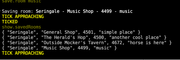
I keep the tick timer on basically all of the time, so useful. I don't even toggle it off. As soon as you quit out it will probably eventually show one TICK APPROACHING message, but then it will stop because it isn't receiving MSDP data from the game. The tick is just a set number of seconds that the user can set (default 25) and so it has no idea of the game's actual tick seconds at any given time.
I keep the disarm wield toggle on all of the time. It's really simple right now just doing a `g 1. || wear 1.` for either the weapon or shield that gets disarmed. I'm going to update this in the next release so you can set a weapon/dual wield or shield and have it logically re-equip the right thing. I'll probably leave the basic `g 1. || wear 1.` as an option as well in case you are changing weapons frequently.
I use `path.find` a ton for quest tracking or any tedious/repetitive moving along the yellow path.
I use `toggle.attack` (ON) and `qw` (or `toggle.track`) (have to set in game target) to track and kill those moving NPCs like panicked bard or the parrot on the pirate ship for example. For the parrot dont turn on auto attack, just track it and paste your respective command quickly when in the room (ex: `grab`).
I use the `toggle.murder` for auto murdering (duh). Works well enough. Going to add in for if the target walks in the room, right now it's only if you walk into a room and see them.
With the new addition of `show.room` (ex: show.room South Square) and `find.room ` (ex: find.room 4432), I have been using those for various things like finding a room from the Codex or trying to find a room when looking for secrets based on cards. Based on a well developed Map.dat file for room names and path finding. I am working on fixing path finding issues when I find them as I play with it. If the path finding messes up for you (depending on how far you were away from the destination), then getting closer to the area/room and using the `find.room` command again will work better. I am also adding a more forgiving `search.room ` that will take a part of the room name (ex: search.room square).
I have started using the new `save.room` for things like druid seeds or dismounting. I'm sure others could have lots of creative uses. And you can use the room vnum from the saved rooms to try and navigate back to it with `find.room `.
I use the Messages box of course for the chat messages that come through, but I have also added a couple of captures like experience gained and showing your proficiency percent of a skill (more to come I'm sure). The beauty of it is being able to look at it or scroll back up if you were moving fast or stepped away and possibly missed an important message.
I keep the Config window open a lot of the time now because of the ease of seeing what Tracked Affects are up or down. It's really useful for any character with a lot of spells to keep up. I even track other things like monster turning/protection creature/whatever and you don't have to have a `:shortcut` for them (ex: set.aff `detect invis:dinv,armor:armo,warcry:war,monster turning,protection creature`).
I don't really type `inventory` or `group` that much in game anymore due to the boxes (msdp.GROUP doesn't give level data, so I still check that sometimes). It's rare I type `score` now as well unless to see some sort of count like items or guildpoints. And of course rare I type `affects` unless to see the actual affect of something because msdp data doesn't provide that. Also I use `up.aff` over and over (if something failed for example). I also toggle `automap` off and `compact` in game. The minimap on the left shows everything the automap shows from all my testing. Typing `map` in game will give a bigger minimap often times I have seen. Something nice, you can see `requesting` hours or `dirt kicking` hours, things like that in the affects window.
And then of course you can hide the left / right / info box at bottom / or entire bottom (gauges and info box) with toggles, as well as swap the left and right if desired. And of course could have the map open on one side or the other or floated. All of that to give a setup that works best for you.
The full map (loaded in via Preferences & Map button at the top) is great to have open in certain situations like Darkhaven or areas with little visibility. And I am adding more over time. Of course the map doesn't really do anything to prevent you from going into those no-exit rooms, so that will be learning on the users part. Also with the minimap in the bottom left, it makes it even easier to see your position/where you fled to without any scrolling text involved and a consistent dedicated window.
I keep the tick timer on basically all of the time, so useful. I don't even toggle it off. As soon as you quit out it will probably eventually show one TICK APPROACHING message, but then it will stop because it isn't receiving MSDP data from the game. The tick is just a set number of seconds that the user can set (default 25) and so it has no idea of the game's actual tick seconds at any given time.
I keep the disarm wield toggle on all of the time. It's really simple right now just doing a `g 1. || wear 1.` for either the weapon or shield that gets disarmed. I'm going to update this in the next release so you can set a weapon/dual wield or shield and have it logically re-equip the right thing. I'll probably leave the basic `g 1. || wear 1.` as an option as well in case you are changing weapons frequently.
I use `path.find` a ton for quest tracking or any tedious/repetitive moving along the yellow path.
I use `toggle.attack` (ON) and `qw` (or `toggle.track`) (have to set in game target) to track and kill those moving NPCs like panicked bard or the parrot on the pirate ship for example. For the parrot dont turn on auto attack, just track it and paste your respective command quickly when in the room (ex: `grab`).
I use the `toggle.murder` for auto murdering (duh). Works well enough. Going to add in for if the target walks in the room, right now it's only if you walk into a room and see them.
With the new addition of `show.room
I have started using the new `save.room
I use the Messages box of course for the chat messages that come through, but I have also added a couple of captures like experience gained and showing your proficiency percent of a skill (more to come I'm sure). The beauty of it is being able to look at it or scroll back up if you were moving fast or stepped away and possibly missed an important message.
I keep the Config window open a lot of the time now because of the ease of seeing what Tracked Affects are up or down. It's really useful for any character with a lot of spells to keep up. I even track other things like monster turning/protection creature/whatever and you don't have to have a `:shortcut` for them (ex: set.aff `detect invis:dinv,armor:armo,warcry:war,monster turning,protection creature`).
I don't really type `inventory` or `group` that much in game anymore due to the boxes (msdp.GROUP doesn't give level data, so I still check that sometimes). It's rare I type `score` now as well unless to see some sort of count like items or guildpoints. And of course rare I type `affects` unless to see the actual affect of something because msdp data doesn't provide that. Also I use `up.aff` over and over (if something failed for example). I also toggle `automap` off and `compact` in game. The minimap on the left shows everything the automap shows from all my testing. Typing `map` in game will give a bigger minimap often times I have seen. Something nice, you can see `requesting` hours or `dirt kicking` hours, things like that in the affects window.
And then of course you can hide the left / right / info box at bottom / or entire bottom (gauges and info box) with toggles, as well as swap the left and right if desired. And of course could have the map open on one side or the other or floated. All of that to give a setup that works best for you.
rexaxle
Posts: 42
4/17/2023, 3:39:14 PM
Just an update on a little progress.
The `search.room` is great, going to just remove `show.room ` for the next release. Have been working on adding some rooms I have missed when I find them and have fixed a number of pathing issues every time I find them (that would be an issue when using `find.room `).
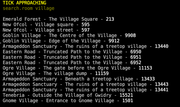
Finally have the storm message MSDP variable fix in place to fix everything/update boxes (ex: 5 lightning messages occur and then game does that reset).
Updated `path.find` to stop at closed doors, had missed that.
Removed the game data from the config box as it took space from the lists just added and moved that game data output to be the first thing shown in the Messages box once you connect. Just a nice to have.
Adding in highlighting target on scan.
Adding in being able to set weapons & shield for disarm wield alias/logic.
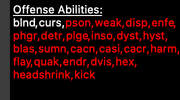
I am adding an `Offense Abilities` and `Defense Abilities` list display on the right (set respectively with `set.off
The `search.room
Finally have the storm message MSDP variable fix in place to fix everything/update boxes (ex: 5 lightning messages occur and then game does that reset).
Updated `path.find` to stop at closed doors, had missed that.
Removed the game data from the config box as it took space from the lists just added and moved that game data output to be the first thing shown in the Messages box once you connect. Just a nice to have.
Adding in highlighting target on scan.
Adding in being able to set weapons & shield for disarm wield alias/logic.
I am adding an `Offense Abilities` and `Defense Abilities` list display on the right (set respectively with `set.off
- ` or `set.def
- `). In the example below that's just showing the capability (I put aliases for a shaman), but it can be any text you want to help you remember anything.
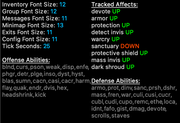
Something cool you can do with these lists based on I am just taking what you pass in basically, is that you can pass in valid ansi color code tags if you wanted to display any of the text in a certain color. (ex: set.off
And possibly some other stuff being added/updated.
Zooka
Posts: 38
4/19/2023, 8:23:34 PM
Hey Rexaxle,
I'm not seeing how you are doing the map creation tasks. Are you just using generic_mapper to create/modify the rooms?
Also, can you please share the colour coding you are using for the map terrain types,ie green is forest?
Thanks,
Zooka
I'm not seeing how you are doing the map creation tasks. Are you just using generic_mapper to create/modify the rooms?
Also, can you please share the colour coding you are using for the map terrain types,ie green is forest?
Thanks,
Zooka
rexaxle
Posts: 42
4/19/2023, 10:04:54 PM
I didn't use any generic_mapper script or anything, I created my own mapping logic. I didn't share that in the package and didn't plan on sharing it. I believe dead shared some mapping logic in another thread that folks can use.
I am continuously making map updates and will update the map available on the main post when I have updates ready. If you are creating your own then I suggest using the other mapping script available in the other thread.
I am basically using nearly the same terrain codes that dead had in his script:
I am continuously making map updates and will update the map available on the main post when I have updates ready. If you are creating your own then I suggest using the other mapping script available in the other thread.
I am basically using nearly the same terrain codes that dead had in his script:
local terrains = {

    ["city (outside)"] = 428,["city (indoors)"] = 428,["inside (indoors)"] = 428,["road (outside)"] = 428,["forest (outside)"] = 422,["hills (outside)"] = 422,

    ["field (outside)"] = 422,["pond (outside)"] = 424,["lagoon (outside)"] = 424,["mountain (outside)"] = 423,["river (outside)"] = 424,

    ["cave (indoors)"] = 428,["rapids (outside)"] = 424,["field (indoors)"] = 422,["underwater (outside)"] = 424,["ocean (outside)"] = 424,

    ["sand (outside)"] = 423,["forest (indoors)"] = 422,["road (indoors)"] = 428,["river (indoors)"] = 424,["pond (indoors)"] = 424,["underwater (indoors)"] = 424

}
Zooka
Posts: 38
4/20/2023, 4:37:02 AM
Thanks for the info, I now have a fully functioning mapping script based on MSDP.
rexaxle
Posts: 42
4/20/2023, 8:52:11 AM
Another big update here!
Updated the map and mpackage download available on the main post.
`show.area world` (in popup)
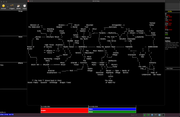
`show.area shadun dalghul` (in popup)
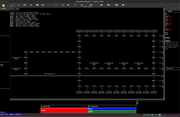
`show.area solace` (in Messages box)
`show.areas`

show direction and how many rooms away target is
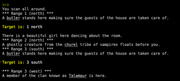
disconnect message

- added `set.off ` and `set.def ` commands to display comma separated text in Config to easily recall (and `get.off` and `get.def` for copying the lists)

- added `show.area ` that will display the area map from the website (either in the Messages box if it's small enough or in a popup window that can be expanded / scrolled to see the full area)

- added `show.areas` to display searchable areas with the newly added `show.area ` alias

- removed `show.room ` is better

- added `set.weapon `, `set.offhand `, and `set.shield ` that will be used with the disarm wield alias (if any of them are set then it will attempt to grab and wield that name in the respective position when disarmed)

- added `set.timer ` (temporary timers/session based) that will allow you to keep track of a timer/description/room by then using the newly added `show.timers` alias and `clear.timer ` and `clear.timers`

- added trigger logic to start the variable reporting again when a storm / reset happens

- added handfuls of yellow highlights on certain words in the Room Desc box (plan to add helpful messages for certain rooms in the future in this box)

- updated auto murder / auto attack for if the target walks into the room

- `path.find` will stop at closed doors and some other blocks

- added logic that will start keeping track of your container when you either open or close it (and will display it in the inventory box)

- added message on scan displaying `Target is:  ` if target is found

- added a `Disconnected At: ` (your system time) when you quit out for convenience

- various additions of rooms to the map & path finding fixes

- updated help & aliases list
Updated the map and mpackage download available on the main post.
`show.area world` (in popup)
`show.area shadun dalghul` (in popup)
`show.area solace` (in Messages box)
`show.areas`
show direction and how many rooms away target is
disconnect message
rexaxle
Posts: 42
4/21/2023, 6:16:50 PM
I noticed the open/close container logic for the inventory window was only working temporarily and I am kind of a stickler when it comes to some things so I just put out another release available for download from the main post that fixes this. So it should start out with your container being shown without an open/close message and then the first time you open or close it starts to pick up on it. Other than that I am keeping notes if anything else seems off.