
Support for AR's mudlet msdp plugin (JMC-like client)
Davairus

Posts: 10697
1/2/2021, 11:00:37 AM
Mudlet is a cross-platform mud client which is very much like JMC and GMUD. I've thrown together a simple mudlet snippet with GMCP. Install instructions are on the mudlet website. https://www.mudlet.org/
This will auto-install on connect to AR. You don't need to do anything.
Manual Plugin instructions incase you need them:
Suggestions for tweaking Mudlet (I can't do this via auto-download):
1) The blue color.
If you find the cabal blue unreadable like me, change it by going to Settings -> Color View -> click Light blue: and then click a little bit above the current position. You have to input into the game again to test it out.
2) Adding more msdp/gmcp stuff.
If you want to extend the plugin snippet, please do so with MSDP and not GMCP. GMCP is bloated with nested json meaning slower processing speeds. All MSDP use requires is turning on a checkbox in mudlet and restarting it. There is a lot of useful MSDP shit to play with.
3) Mapper.
You can type "map help" in mudlet for the maps. I went through the tutorial and found it really easy to use. But that is after already doing a lot of work on mudlet. I added a mudschool map because its required for the icon but I've decided I'm not up for handing out game maps.
4) Font sizes
Vanisse tested and had a bit of issues with the font sizes, but I can't really help you. Its made on a macbook pro 15 inch retina, and I dont have access to a whole fleet of devices to check every case. If you desire to update fonts, its just a matter of going in the layout script (scripts > armudletgui > ar_gui_scripts > layout_script). Look for the number "250" if you want to change widths. The 250 means 250 pixels. There is probably a better way but I havent found it.
Sample
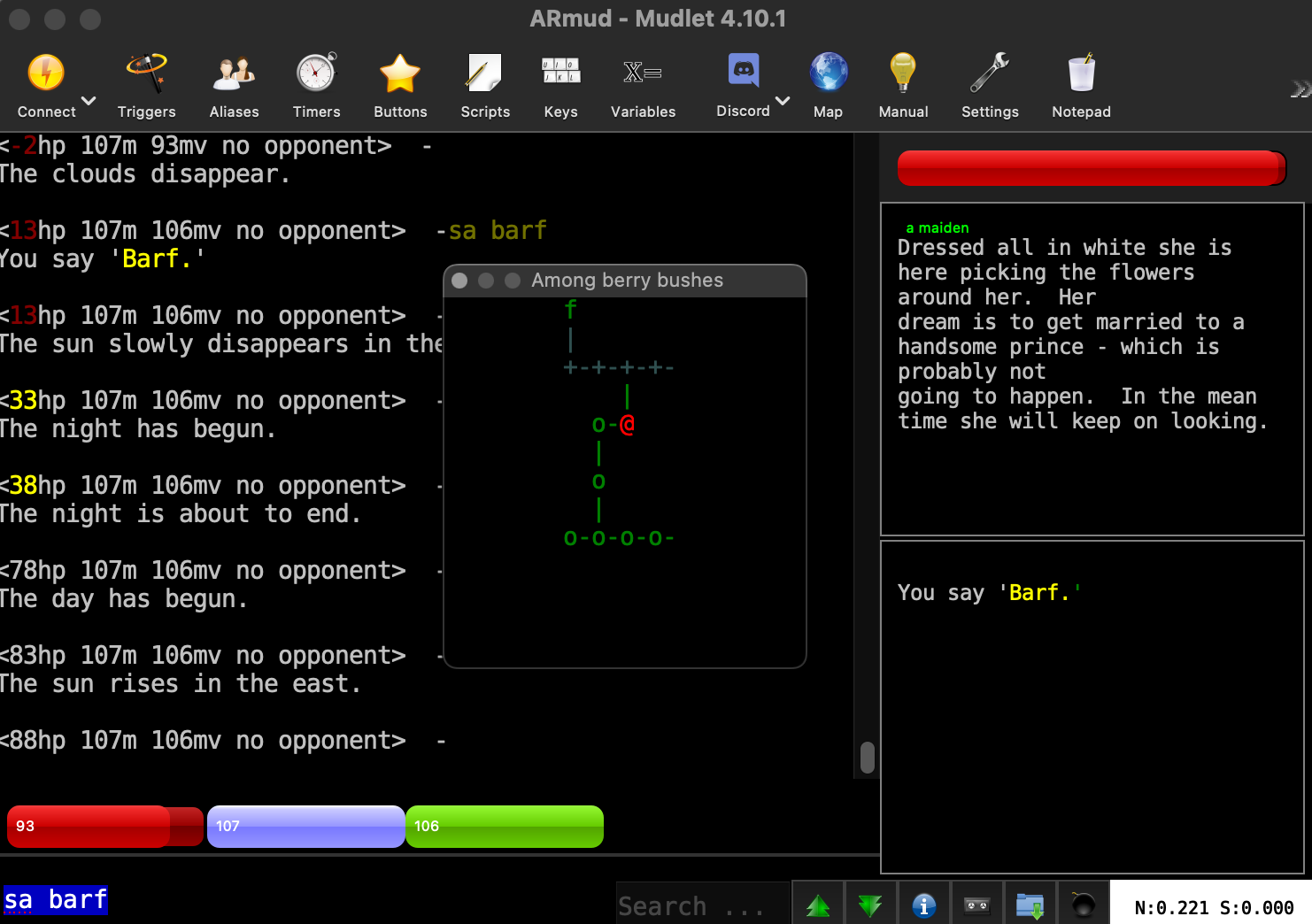
Also just a reminder that the map window is FLOATING so just put it wherever the hell you want.
This will auto-install on connect to AR. You don't need to do anything.
Manual Plugin instructions incase you need them:
https://abandonedrealms.com/plugins/

Direct link: https://abandonedrealms.com/plugins/mudlet/armudletgui.mpackage


1. Downloaded the latest version of mudlet from the internet (it was written using 4.10.1) https://www.mudlet.org/

2. Downloaded the package using the link above

3. Create a new profile, connect to AR as usual.

4. Open Package Manager, click install, pick the zip file and click open. Done!
Suggestions for tweaking Mudlet (I can't do this via auto-download):
1) The blue color.
If you find the cabal blue unreadable like me, change it by going to Settings -> Color View -> click Light blue: and then click a little bit above the current position. You have to input into the game again to test it out.
2) Adding more msdp/gmcp stuff.
If you want to extend the plugin snippet, please do so with MSDP and not GMCP. GMCP is bloated with nested json meaning slower processing speeds. All MSDP use requires is turning on a checkbox in mudlet and restarting it. There is a lot of useful MSDP shit to play with.
3) Mapper.
You can type "map help" in mudlet for the maps. I went through the tutorial and found it really easy to use. But that is after already doing a lot of work on mudlet. I added a mudschool map because its required for the icon but I've decided I'm not up for handing out game maps.
4) Font sizes
Vanisse tested and had a bit of issues with the font sizes, but I can't really help you. Its made on a macbook pro 15 inch retina, and I dont have access to a whole fleet of devices to check every case. If you desire to update fonts, its just a matter of going in the layout script (scripts > armudletgui > ar_gui_scripts > layout_script). Look for the number "250" if you want to change widths. The 250 means 250 pixels. There is probably a better way but I havent found it.
Sample
Also just a reminder that the map window is FLOATING so just put it wherever the hell you want.
maeve
Posts: 68
1/2/2021, 2:39:31 PM
Good job!
Perhaps its time to get AR to be one of the pre-set/default mud connections on mudlet base package? ;)
Perhaps its time to get AR to be one of the pre-set/default mud connections on mudlet base package? ;)
Olyn

Posts: 3285
1/2/2021, 6:28:58 PM
Maeve, that is in progress. Kalist got us started on that by reaching out to them and we've been in contact. They have a list of requirements and Dav's plugin is one of the last things we needed to do for them.
Xenyar
Posts: 696
1/3/2021, 1:13:28 AM
This is a great idea. Big thumbs up for putting this together guys
dead
Posts: 120
1/23/2022, 8:31:57 PM
Love the mudlet package for AR. Been trying to make my own changes to it and have a quesiton.
Do the script folders get over written if there is an update on your end?
Overwritten if changed on my end?
Do the script folders get over written if there is an update on your end?
Overwritten if changed on my end?
Davairus
Posts: 10697
1/23/2022, 10:16:07 PM
Hey dead, I think its possible it may tell you there is a newer version available, and prompt you to install it. I have not made any updates, although probably will try once windows 11 finally goes live.
I have my own copy of mudlet and have local settings changes that aren't public. I can't say I have ever seen them delete. I'd still recommend keeping your scripts handy if you don't want to lose them though.
I have my own copy of mudlet and have local settings changes that aren't public. I can't say I have ever seen them delete. I'd still recommend keeping your scripts handy if you don't want to lose them though.
Davairus
Posts: 10697
1/25/2022, 9:32:24 AM
updated the mudlet plugin today so I guess we will find out.
dead
Posts: 120
1/25/2022, 9:46:39 PM
I does overwrite. Have to restart to see the effects, but it does.
Did not mess with scripts I created, but lost edits I made to your scripts.
Luckily all I was trying to do was make space on the left and move the minimap over there.
Both problems you solved. Thanks! Much cleaner then my hack.
Did not mess with scripts I created, but lost edits I made to your scripts.
Luckily all I was trying to do was make space on the left and move the minimap over there.
Both problems you solved. Thanks! Much cleaner then my hack.
Davairus
Posts: 10697
1/27/2022, 3:42:12 AM
Glad to hear it. Its been tested cross-platform so we should be good for a bit.
I recommend to go the MSDP route for extra addons (affects, inventory windows), the GMCP protocol is lightweight
I recommend to go the MSDP route for extra addons (affects, inventory windows), the GMCP protocol is lightweight
Davairus
Posts: 10697
7/22/2022, 5:49:53 PM
new version out - added affects window
Davairus
Posts: 10697
8/13/2022, 5:41:51 PM
new version - updated gauges (smaller, more consistent with webclient), added hour of day to the minimap (also consistent with webclient). client restart might be required to pick up the new gauges stylesheet properly, but otherwise let me know if it looks jacked up, the old stuff is there commented out if you would rather revert
Davairus
Posts: 10697
3/9/2023, 9:16:04 AM
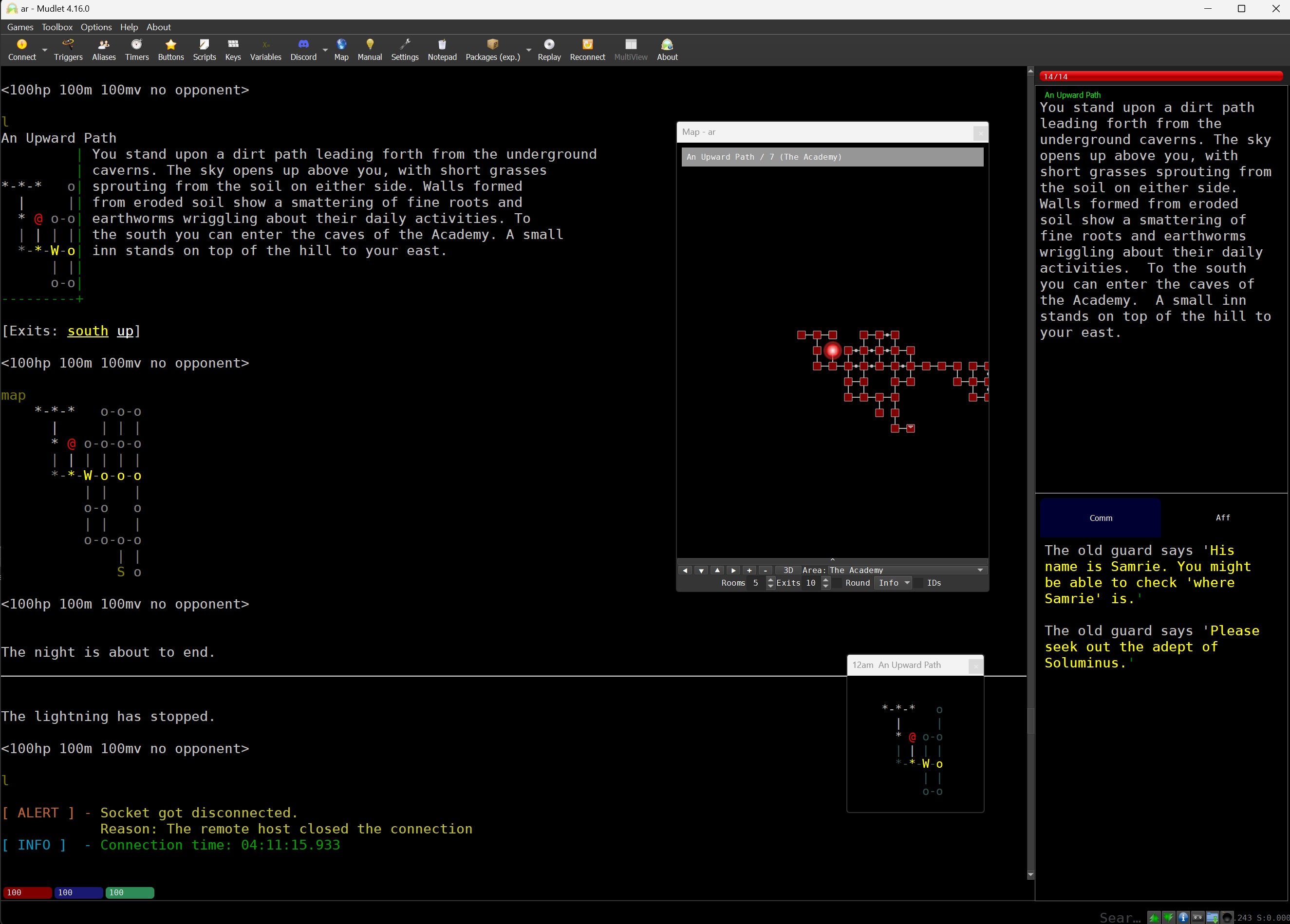
new version of mudlet script is out - fixed the bugs stopping the "generic mapper" from downloading for newbs. also incase you didnt notice, the generic mapper window can be undocked and put anywhere just like the little one it has.
AR has maps
AR has maps
Zooka
Posts: 38
3/16/2023, 1:33:07 AM
I'm finding MSDP very interesting, so much that I'm considering moving clients.
There seems to be a problem with msdp.GROUP though, it won't parse correctly in Mudlet when a report is requested.
Mudlet error window;
Should I submit a bug or could this be a Mudlet issue?
There seems to be a problem with msdp.GROUP though, it won't parse correctly in Mudlet when a report is requested.
Mudlet error window;
[ERROR:] object: function:
(right here) ------^
at lua_yajl.c line 253>
Should I submit a bug or could this be a Mudlet issue?
Davairus
Posts: 10697
3/16/2023, 5:48:21 AM
I don't think its you / mudlet. We are just doing msdp tables "wrong". The msdp "standards" are super duper loose, while the mudlet client on the other hand has a great deal of rigor. They probably wanted nested msdp tables whereas I just sent json in tables when I wrote that.
Davairus
Posts: 10697
3/16/2023, 7:23:51 AM
i fixed the mudlet msdp group/inv tonight and released a new version to clean up some weird scripting problems. if you have noticed you have multiple copies of a file called jormox generic map script, delete all of them except the one that is under "generic mapper" folder and then exit and re-open mudlet.
Zooka
Posts: 38
3/17/2023, 4:47:05 AM
Fantastic, thank you. I'll do some testing and let you know if I find any anomalies.